Advanced Mode
Video walkthrough
Detailed overview
Trigger key & Aim notes
The attack flow consists of detection, aim, and trigger key. Detection and aim values are in the *Aim Profile, while trigger key values are in each trigger key tab. Each trigger key can assign hipfire/ADS *Aim Profile, switched by ADS key state. Provides 10 Aim Profile slots for customization; in most cases you do not need to split it this finely.
Video tutorial
Global - Required
Global - Required
Page image
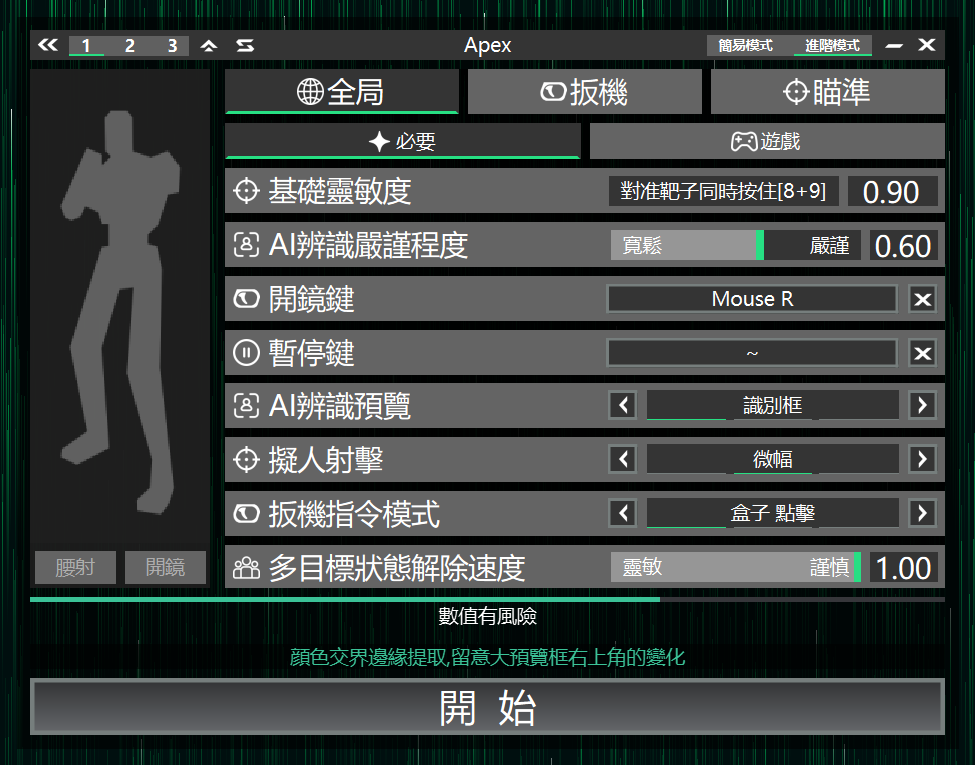
Base sensitivity
Used to calibrate the same screen displacement to mouse movement, ensuring consistent crosshair movement across devices.
Setup steps
1.Enable AIG Assist
2.Enter the game
3.Aim at a fixed target
4.Press and hold the top-row number keys 8 and 9 together
5.Wait until the crosshair stops moving to complete calibration
AI detection strictness
Determines how confident a target must be as an enemy before locking on.
Looser settings find enemies more easily in complex battlefields, but increase false positives. Stricter settings reduce false positives, but make it harder to find enemies in chaotic fights.
ADS key
Assign the game's ADS key so different Aim Profile can be applied in ADS state.
Pause key
Press in-game to pause AIG Assist, press again to resume.
AI detection preview
Choose the AI detection preview mode
1.detection box
2.Off
3.Screenshot display
Humanized shooting
Adds natural sway during shooting, with amplitude limited to within the enemy's body volume.
No extra sway at long distance; only takes effect when the target's exposed area is large enough.
Trigger command mode
If the trigger key does not fire properly, try switching to this mode to resolve it.
Multi target release speed
Set the release delay time for multi-target state.
Usually 0.5 seconds is enough; if mislocks still happen in chaotic fights, increase it.
Aim Trigger
Trigger key - Aim
Page image
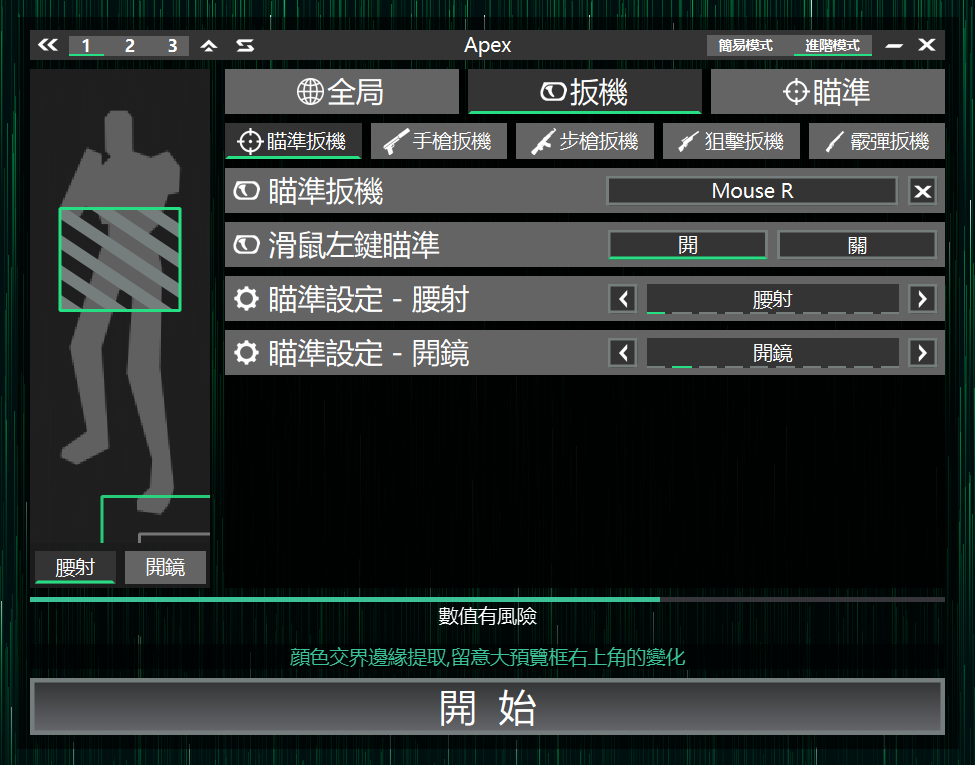
Aim Trigger
Does not fire; only provides auto-aim.
Left mouse aim
Whether to enable aim while holding the left mouse button. Generally recommended to enable.
Aim Setting - Hipfire
Specify the Aim Profile used for hipfire.
Aim Setting - ADS
Specify the Aim Profile used for ADS.
Pistol Trigger
Trigger key - Pistol
Page image
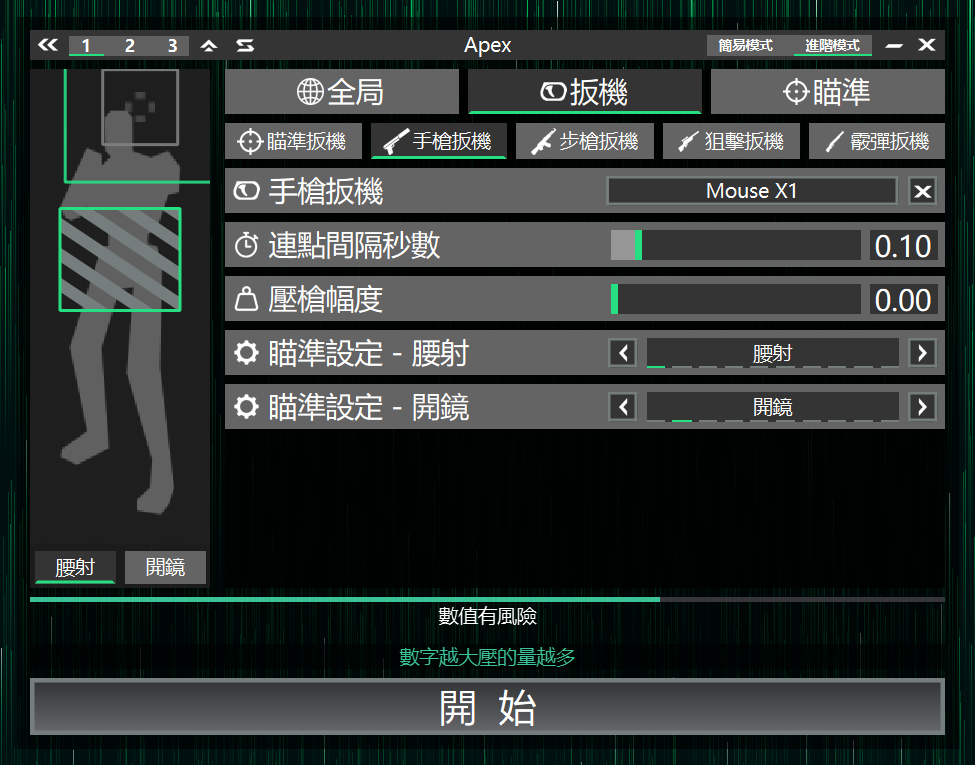
Pistol Trigger
Auto click, suitable for single-shot weapons.
Click interval (sec)
Click frequency setting; default is fine in most cases.
Recoil control
Adjust recoil compensation strength.
Aim Setting - Hipfire
Specify the Aim Profile used for hipfire.
Aim Setting - ADS
Specify the Aim Profile used for ADS.
Rifle Trigger
Trigger key - Rifle
Page image
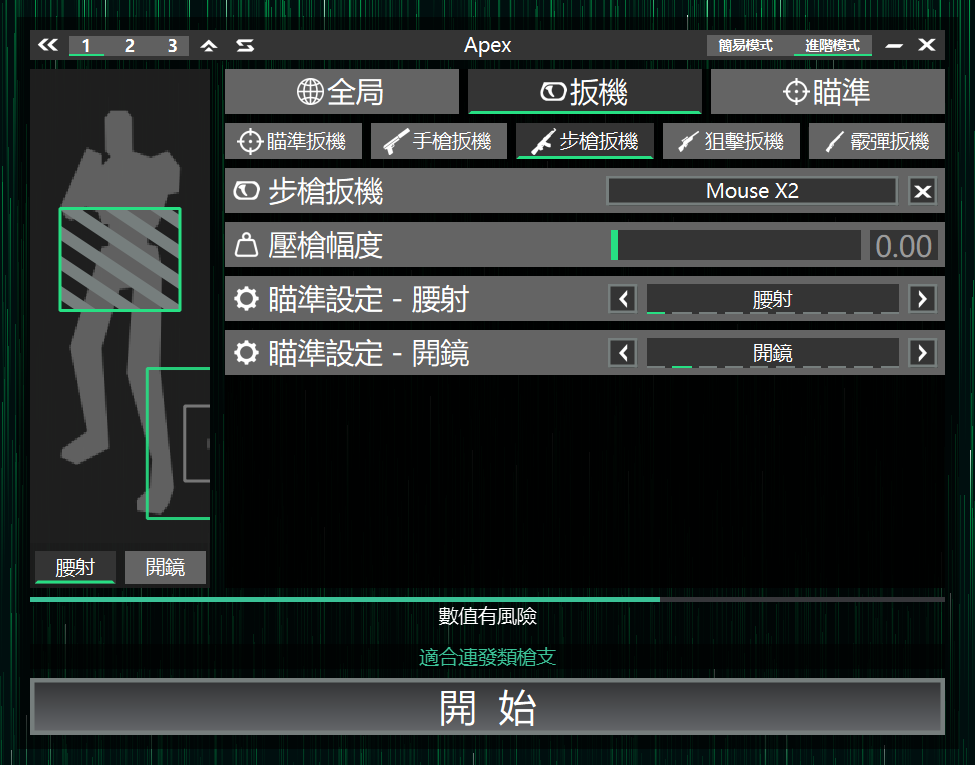
Rifle Trigger
Hold the trigger key after the crosshair contacts the target until it disappears; suitable for automatic weapons.
Recoil control
Adjust recoil compensation strength.
Aim Setting - Hipfire
Specify the Aim Profile used for hipfire.
Aim Setting - ADS
Specify the Aim Profile used for ADS.
Sniper Trigger
Trigger key - Sniper
Page image
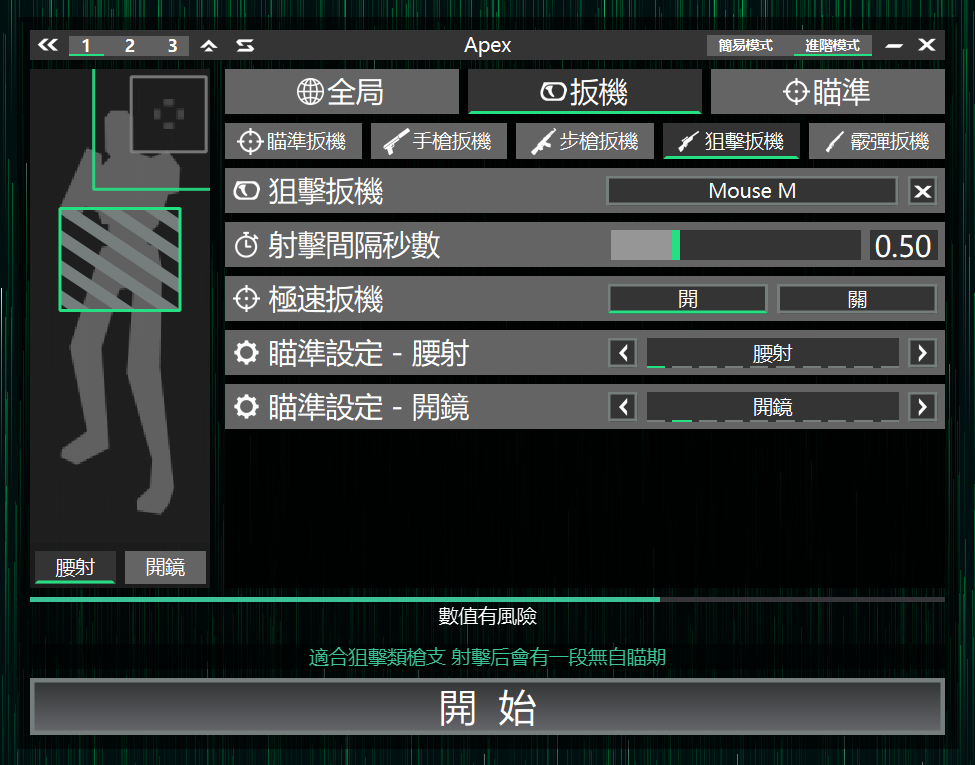
Sniper Trigger
After each shot, enters a brief no-response period to avoid auto-aim during reload.
Suitable for single-shot weapons that cannot fire continuously.
Shot interval (sec)
Length of the no-response period after shooting; adjust based on sniper reload time.
Fast trigger
Fire quickly when the crosshair touches the target outline edge; suitable for weapons that kill with a hit to any part.
Aim Setting - Hipfire
Specify the Aim Profile used for hipfire.
Aim Setting - ADS
Specify the Aim Profile used for ADS.
Shotgun Trigger
Trigger key - Shotgun
Page image
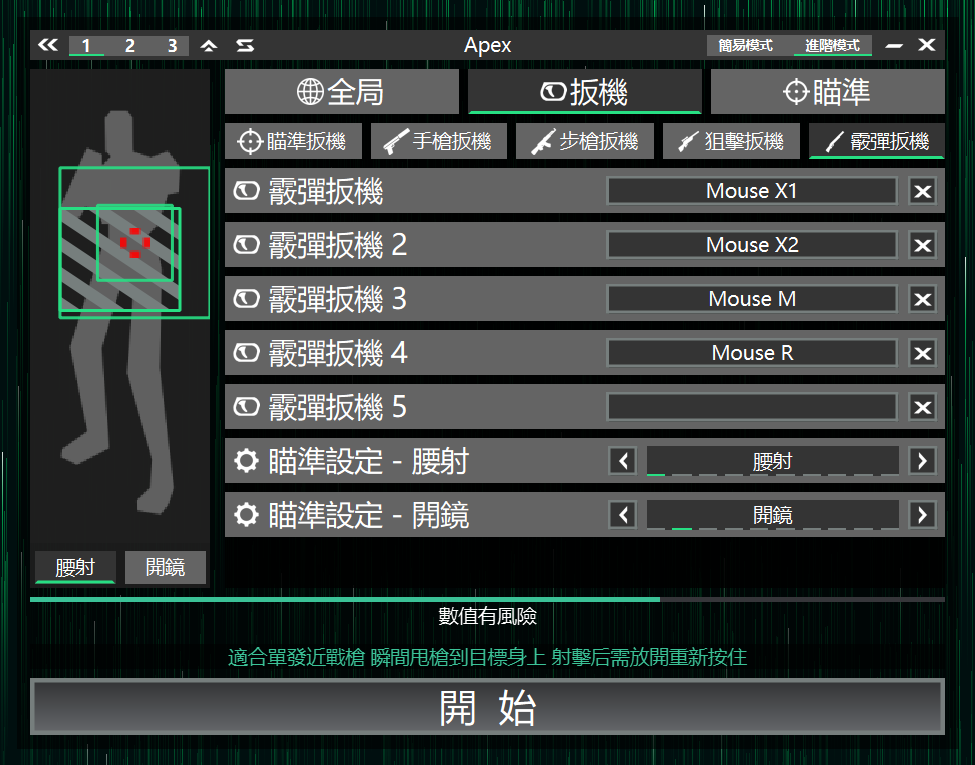
Shotgun Trigger
When a target is found, snap the aim instantly to the enemy.
Shotgun Trigger 2
Can be used as an add-on effect for other trigger keys, providing 1~5 sets for flexible combos, letting other trigger keys quickly pull the crosshair at aim start to speed up firing rhythm.
Combined trigger keys carry higher risk and may affect account safety
Aim Setting - Hipfire
Specify the Aim Profile used for hipfire.
Aim Setting - ADS
Specify the Aim Profile used for ADS.
Aim Profile
Aim Profile
Page image
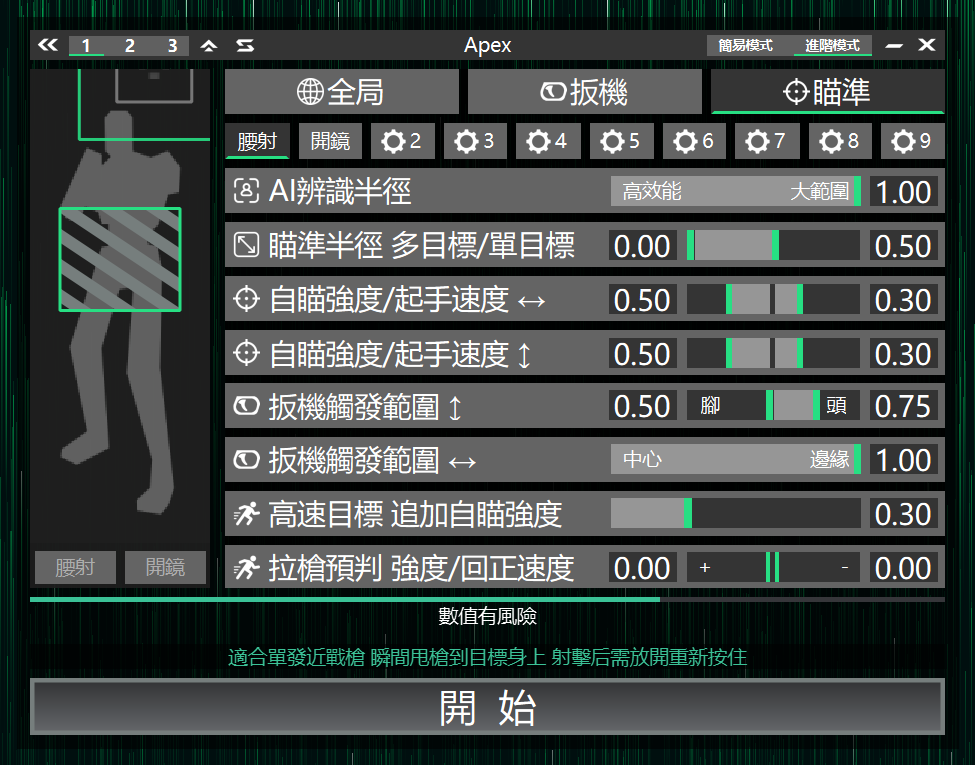
AI detection radius
The larger the detection range, the easier to find targets quickly, but it requires higher performance.
Aim radius multi/single target
If the detection radius is too large and causes mislocks, reduce this value.
Targets must be within the radius to trigger aim; smaller is recommended for chaotic fights.
Aim strength / initial speed ?
Aim strength / initial speed ??
Aim strength is the crosshair movement speed; initial speed provides a starting speed at longer distances.
You can set horizontal and vertical strengths separately; for realism, set vertical slightly lower than horizontal.
Trigger range ??
Set which body part height triggers the trigger key based on the crosshair's vertical position.
Trigger range ?
Define how close the crosshair must be to the target's centerline to trigger the trigger key.
If headshots are important, set smaller; if targets move intensely, set larger. Smaller is stricter and slower.
Fast-target boost
Used for tracking fast-moving targets.
When aim strength is insufficient, additional strength is added until the crosshair is close. Higher values track faster, but may cause more jitter on stationary targets.
Lead strength / return
At long distance, this setting creates lead offset.
Higher strength builds offset more easily, but reduces the auto-aim feel; higher return makes it disappear faster. Common in battle royale; for VALORANT-like games, set to 0 to disable.
Congratulations, you're done
- Enjoy the game
- Learn Advanced Mode
- Learn Profile Set
- Learn game-specific features
- Become an expert